In this article
- Option 1: Convert in your browser
- Option 2: Let the iPhone convert when sharing
- Option 3: Convert on a Mac
- Option 4: Open HEIC on Windows
- Stop it happening: make the iPhone shoot JPG
- After converting
- Does converting lose quality?
- Things that change when you convert
- Converting a whole batch
- Which method suits you?
- Should you convert at all?
- Frequently asked questions
You take a photo on an iPhone, send it to a computer or try to upload it to a form, and get an error or a file nothing will open. The file name ends in .heic. This is Apple's default photo format, and while it is efficient, a lot of software still expects JPG. Here is how to convert it, from fastest to most permanent.
In short: The fastest fix is a browser converter. The lasting fix is one iPhone setting, either to share as JPG automatically or to shoot in JPG from now on.
Option 1: Convert in your browser
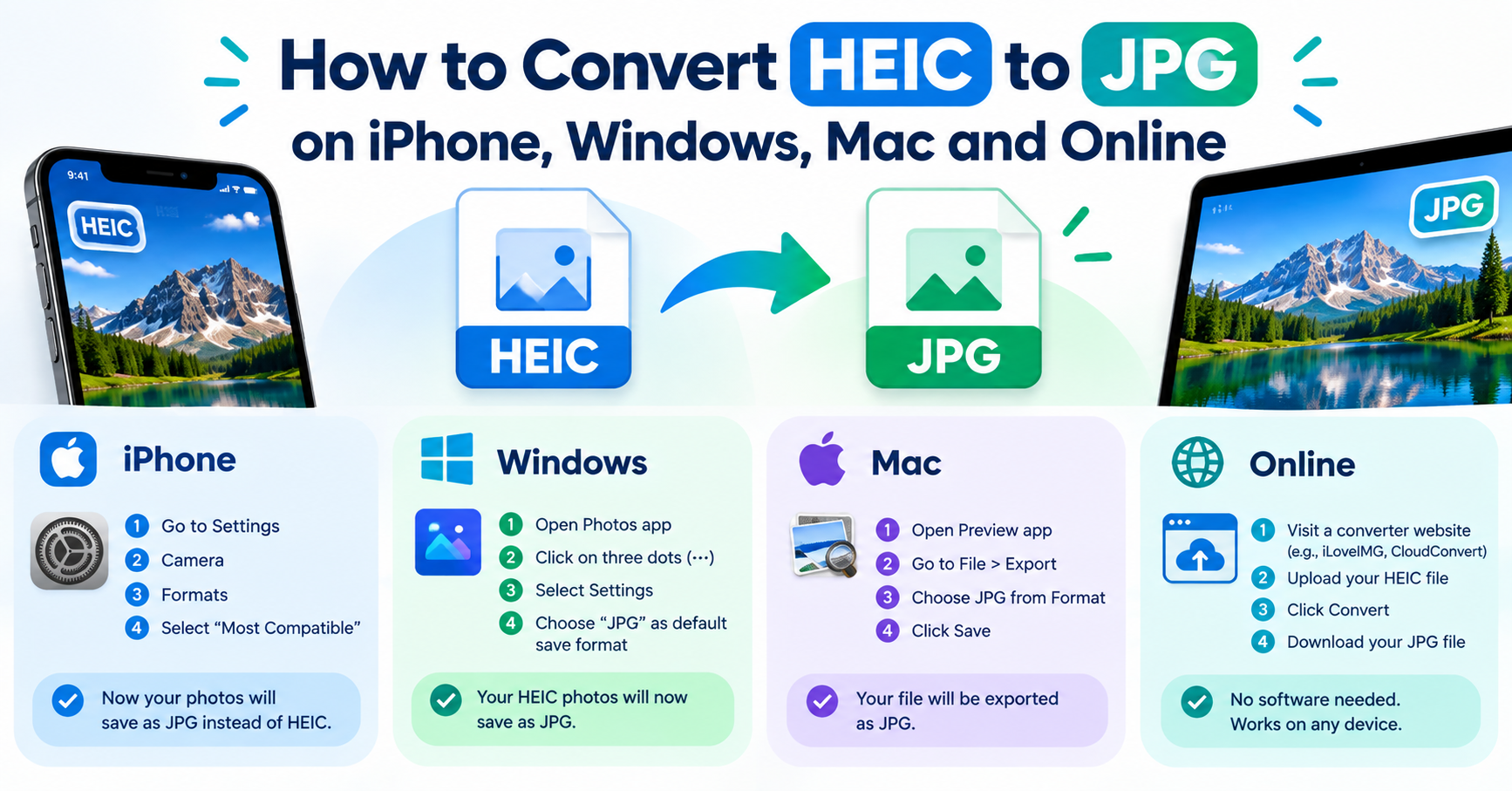
If you already have the HEIC files on a computer, the quickest route is the HEIC to JPG Converter. Add the photos, choose JPG, and download the results. The conversion happens on your device, so the photos are not uploaded anywhere. It works the same on Windows, macOS, Linux and Chromebooks.
Option 2: Let the iPhone convert when sharing
An iPhone often converts to JPG by itself, depending on how you send the photo:
- Mail and many apps: photos attached through the share sheet are usually sent as JPG.
- Cable transfer to a PC or Mac: open Settings, tap Photos, scroll to “Transfer to Mac or PC” and choose Automatic. Photos are then converted to a compatible format when imported over a cable.
- Files app trick: in Photos, select the pictures, tap Share, then Copy Photos. Open the Files app, long-press in a folder and tap Paste. The pasted copies are JPG files.
AirDrop to a Mac and iCloud Photos generally keep the original HEIC, which is where people most often run into trouble.
Option 3: Convert on a Mac
- Open the HEIC photo in Preview. To convert several, select them all in Finder and open them together, then select them all in Preview's sidebar.
- Choose File → Export (or Export Selected Images).
- Set Format to JPEG, choose a quality, and save.
On recent versions of macOS you can also right-click the files in Finder and choose Quick Actions → Convert Image.
Option 4: Open HEIC on Windows
Windows 10 and 11 can display HEIC files in the Photos app once the right extensions are installed from the Microsoft Store. Search the Store for HEIF Image Extensions; some systems also ask for HEVC Video Extensions, for which Microsoft may charge a small fee. After that, open the photo in Photos and use Save as to export a JPG.
If you only need to convert a batch occasionally, the browser method above avoids installing anything.
Stop it happening: make the iPhone shoot JPG
- Open Settings and tap Camera.
- Tap Formats.
- Choose Most Compatible.
New photos will now be saved as JPG. They take up more space, and existing photos are not changed. If storage is tight, a reasonable compromise is to leave the camera on High Efficiency and set transfers to Automatic as described above.
After converting
JPG versions of iPhone photos are often 2 to 5 MB each. If you are uploading them to a website or emailing several, run them through the Image Compressor with a maximum width of around 1600 to 2000 pixels first.
Does converting lose quality?
A little, in theory. HEIC and JPG both discard some detail to save space, so going from one to the other means compressing a second time. At a JPG quality of about 90, the difference is not visible in normal viewing or in prints at ordinary sizes. Keep the HEIC originals in your photo library if you may want to edit the pictures later, and convert copies for sharing.
Things that change when you convert
- Live Photos become still pictures. A JPG holds one frame. The short video that accompanies a Live Photo is not carried across.
- Location and camera details may be removed. Browser-based converters, including ours, redraw the picture and save only the image itself, so embedded data such as GPS coordinates is left behind. That is useful for privacy when posting online. If you need the data kept, export from the Photos app instead.
- Files get bigger. Expect a JPG to take noticeably more space than the HEIC it came from.
- Colours can shift very slightly on photos taken in wide-colour modes, because JPG is normally saved in the standard sRGB colour space. For everyday photos this is rarely noticeable.
Converting a whole batch
For a handful of pictures, add them all to the converter at once and use Download all. For hundreds, it is quicker to let a computer do it: on a Mac, select the photos in Finder, right-click and choose Quick Actions → Convert Image, then pick JPEG. On an iPhone, copying photos to the Files app, or sending them by AirDrop or email with the automatic setting on, converts them as they leave the phone.
Which method suits you?
| Method | Best when | Needs |
|---|---|---|
| Browser converter | You have a few photos and any device | Nothing to install |
| iPhone automatic conversion | You are sending photos from the phone itself | A setting changed once |
| Mac Preview or Photos | The files are already on a Mac | Built-in apps |
| Windows HEIF extension | You want HEIC files to open directly on a PC | An extension from the Microsoft Store |
| Shoot in JPG | You regularly share with Windows or older software | More storage per photo |
Should you convert at all?
HEIC exists because it stores a photo of similar quality in noticeably less space than JPG, and it can hold extras such as depth data and Live Photo frames. If your photos stay within Apple devices, leaving them as HEIC saves storage. Convert when a file has to go somewhere that may not understand it: an upload form, a Windows PC, a printer’s website or an older phone.
After converting, you can shrink the JPG further with the Image Compressor if an upload limit is tight.
Frequently asked questions
Does converting HEIC to JPG lose quality?
A little, in theory, because JPG is a lossy format. At a quality setting of 90 or above the difference is not visible in normal use. The JPG file will usually be larger than the HEIC original.
Why does my iPhone use HEIC at all?
HEIC stores a photo in roughly half the space of a comparable JPG, which saves storage on the phone and in iCloud.
Can Android phones open HEIC files?
Recent versions of Android can display HEIC photos, but support varies between apps. Converting to JPG is the reliable option when sharing.