In this article
“Send it at 300 dpi.” “Web images should be 72 dpi.” “This photo is low-res.” All three are about resolution, and they mean three different things. Once the terms are separated, deciding whether an image is good enough for a screen or a print becomes simple arithmetic.
In short: On screens only the pixel dimensions matter. For print, divide the pixels by the print size to get pixels per inch: about 300 is sharp at reading distance, and less is fine for anything viewed from further away.
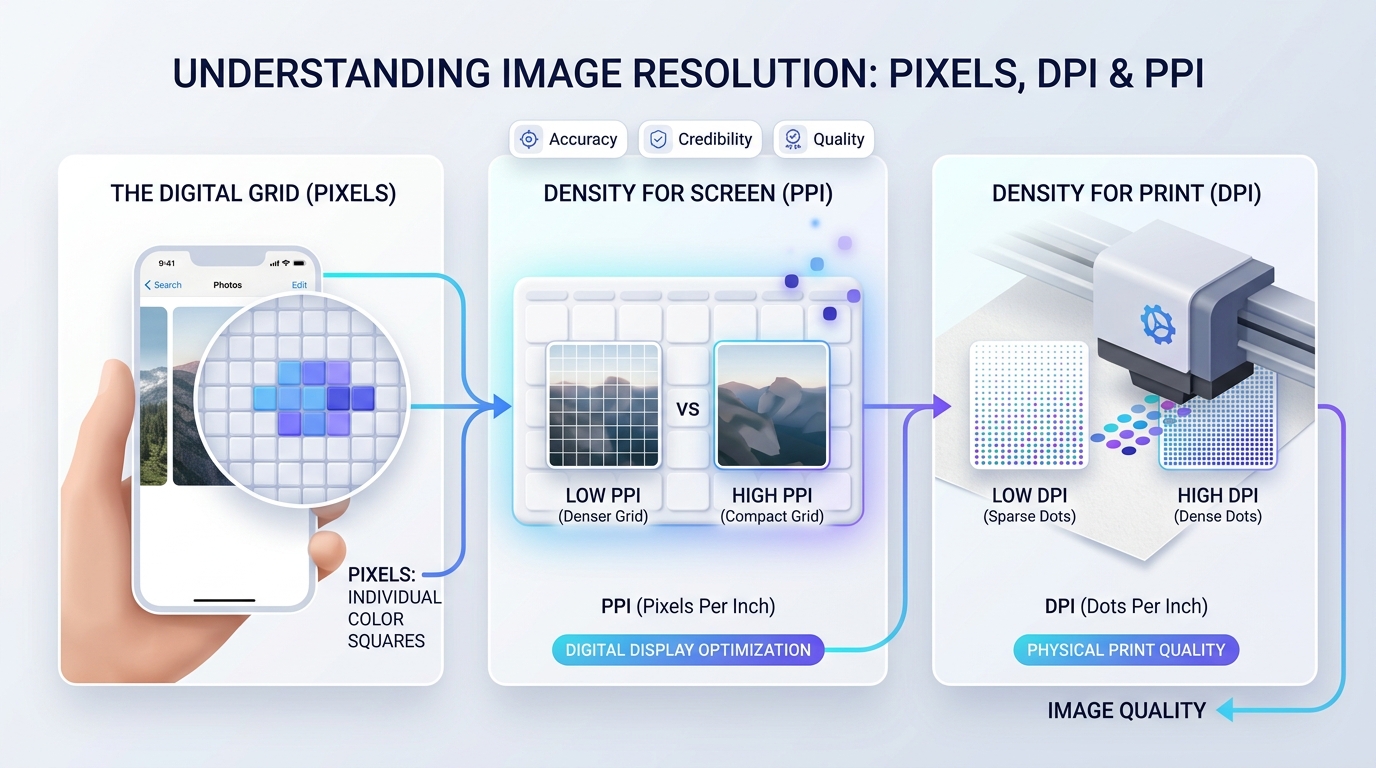
Pixel dimensions: the only real measure of detail
A digital image is a grid of pixels. Its pixel dimensions, such as 4000 × 3000, tell you how much detail it contains. Multiply them and you get the megapixel count: 4000 × 3000 is 12 million pixels, or 12 megapixels. Nothing else about the file adds or removes detail.
PPI: pixels per inch
PPI describes how tightly those pixels are packed when the image is shown at a physical size. The same 3000-pixel-wide photo is 300 PPI when printed 10 inches wide and 100 PPI when printed 30 inches wide. The image has not changed; it has just been spread over more paper. Screens have a PPI too: a phone packs in far more pixels per inch than a desktop monitor.
DPI: dots per inch
DPI strictly describes a printer: how many tiny dots of ink it places per inch. Printers use several dots to reproduce one pixel’s colour, so a printer’s DPI figure is much higher than the image PPI it needs. In everyday speech people say DPI when they mean PPI, and when a print shop asks for “300 dpi” they mean 300 pixels per inch at the printed size.
| Term | Describes | Example |
|---|---|---|
| Pixel dimensions | The image itself | 4000 × 3000 pixels |
| PPI | Pixels per inch at a given size | 3000 px across 10 in = 300 PPI |
| DPI | Ink dots a printer lays down | A printer rated at 1200 dpi |
The 72 dpi myth
Image files can carry a PPI or DPI number in their metadata, and many are labelled 72. On a screen that number is ignored. A browser shows an 800-pixel-wide image using 800 pixels, whatever the label says. Changing a file from 72 to 300 dpi without changing its pixel dimensions does nothing to how it looks on a website and nothing to its quality. For the web, think only in pixels.
How many pixels do I need to print?
Multiply the print size in inches by the PPI you want. At 300 PPI, which looks sharp when held at reading distance:
| Print size | Inches | Pixels needed at 300 PPI | Acceptable at 150 PPI |
|---|---|---|---|
| Postcard, 10 × 15 cm | 4 × 6 | 1200 × 1800 | 600 × 900 |
| A5 | 5.8 × 8.3 | 1748 × 2480 | 874 × 1240 |
| A4 | 8.3 × 11.7 | 2480 × 3508 | 1240 × 1754 |
| US Letter | 8.5 × 11 | 2550 × 3300 | 1275 × 1650 |
| A3 | 11.7 × 16.5 | 3508 × 4961 | 1754 × 2480 |
Larger prints are viewed from further away and need fewer pixels per inch. A poster on a wall looks fine at 150 PPI, and banners are often printed at much less. If you work in centimetres, divide by 2.54 to get inches first.
How many pixels do I need for a screen?
Match the size at which the image is displayed, then double it for high-density screens if sharpness matters. An image shown 600 pixels wide in a page layout looks crisp on every device at 1200 pixels wide. Beyond that you are sending pixels nobody can see. The Image Resizer sets exact pixel dimensions, and the Image Compressor reduces the file size afterwards.
Can I increase resolution?
You can increase the pixel count, but ordinary enlarging only spreads existing detail across more pixels, so the result looks soft. Newer AI-based upscalers do better by estimating plausible detail, which can be convincing for photos and wrong for text or faces. Neither recovers information that was never captured. Always start from the largest original you have.
Common mistakes
- Changing the DPI label and expecting a sharper print. Only more pixels help.
- Uploading full camera resolution to a website. It slows the page and is scaled down anyway.
- Sending a screenshot of a photo. It has only your screen’s pixels. Send the original file.
- Letting a messaging app shrink the image. Many apps reduce photos heavily; use a “send as file” or “original quality” option when detail matters.
Frequently asked questions
Is DPI the same as PPI?
Strictly no: DPI is printer ink dots and PPI is image pixels per inch. In practice people use DPI for both, and a request for 300 dpi means 300 pixels per inch at print size.
Do web images need to be 72 dpi?
No. Browsers ignore the DPI value stored in an image file. Only the pixel dimensions affect how it appears on screen.
What resolution do I need for printing?
About 300 pixels per inch for anything held in the hand, and 150 or less for posters viewed from a distance. Multiply the print size in inches by that figure.
How do I check an image's resolution?
Look at its pixel dimensions in the file's details or properties: right-click and choose Properties on Windows or Get Info on a Mac.